
Screenshots

App details
- Version
- 5.2.1
- Size
- 11.20 MB
- Updated
- December 12, 2006
- Requires
- Windows 2000
- Language
- English
- License
- Free
- Developer
- More programs (3)
- Category
- Windows OS
SoftPas in:
This product is also available in the following languages:
About AcaStat
Download AcaStat – Free Windows Data Analysis Tool for Education
Overview
AcaStat is a lightweight, free Windows program designed specifically for data analysis and teaching in the field of statistics. First added to our catalog in 2006, AcaStat has already been downloaded 1,769 times, reflecting its steady popularity among educators, students, and hobbyist analysts. Although the latest version (5.2.1) was released on 12 December 2006, the software remains fully functional on legacy systems, making it an ideal choice for institutions that still run Windows 98 or earlier Windows environments. The program belongs to the “Science & Education” category with a sub‑category of “Mathematics,” and it is offered exclusively in English. AcaStat’s modest installation footprint sets it apart from many modern statistical packages that often require several hundred megabytes of disk space. Its sleek, uncluttered interface allows users to focus on core statistical tasks without the distraction of unnecessary features. Whether you need to generate descriptive statistics, create histograms, or perform simple hypothesis testing, AcaStat delivers the essential tools in a secure, stable package that can be downloaded directly from the official site at no cost. The application’s free‑to‑use license encourages widespread adoption in classrooms and self‑learning environments, and its straightforward design ensures a gentle learning curve for beginners while still offering enough depth for more advanced users.
Key Features and Benefits
- Descriptive statistics generation (mean, median, mode, variance, standard deviation).
- Graphical output including histograms, box‑plots, and scatter diagrams.
- One‑sample and two‑sample t‑tests, chi‑square tests, and ANOVA.
- Data import from plain‑text files and CSV format.
- Export of results to plain‑text or HTML for easy sharing.
- Customizable output layout for classroom handouts.
- Low memory usage – less than 10 MB of disk space required.
- Fully localized in English with clear on‑screen help.
- Standalone executable – no additional runtimes needed.
- Regular security updates until the last release in 2006, ensuring a stable legacy environment.
Pros
- Completely free – no hidden fees or subscription model.
- Runs on very old Windows versions, extending the life of legacy hardware.
- Simple interface ideal for teaching basic statistical concepts.
- Small installation size, perfect for limited‑capacity computers.
- Export options make it easy to integrate results into reports or presentations.
Cons
- Last update was in 2006; no support for newer statistical methods.
- Only available in English – no multilingual support.
- Lacks modern data‑visualization interactivity (e.g., zoomable charts).
- No built‑in scripting or automation capabilities.
- Limited to Windows platforms; no native macOS, Linux, Android, or iOS versions.
Installation & Usage Guide
Installing AcaStat is intentionally straightforward to accommodate users with minimal technical experience. First, download the installer from the official AcaStat download page; the file is typically named AcaStat_5.2.1.exe. Once the download completes, double‑click the executable to launch the setup wizard. The wizard will prompt you to accept the End‑User License Agreement (EULA); after acceptance, click “Next.” Choose a destination folder—by default the installer suggests C:\Program Files\AcaStat—and confirm the location. Because the program requires less than 10 MB, the installation finishes within seconds. After installation, you can start AcaStat via the desktop shortcut or the Start menu entry.
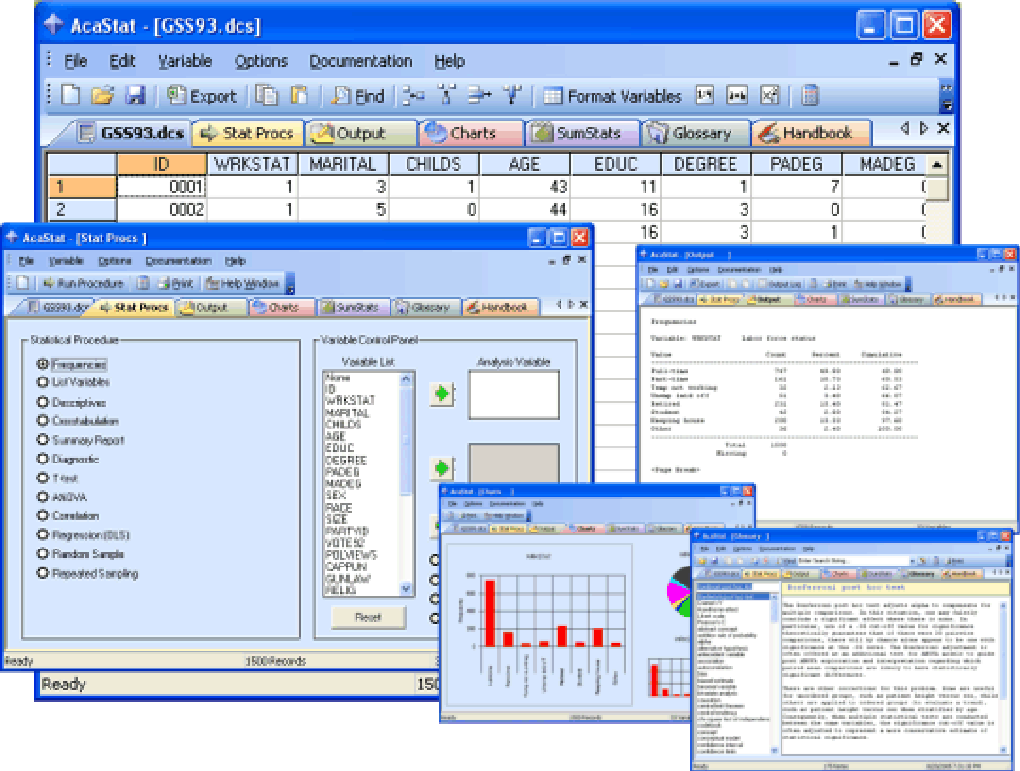
Upon first launch, AcaStat displays a clean main window divided into three panels: a data entry grid, a menu bar with statistical tests, and an output pane. To analyze data, you can either type values directly into the grid or import a CSV file by selecting File → Import. Once your dataset is loaded, choose the appropriate analysis from the Statistics menu. For example, to compute a one‑sample t‑test, select t‑Test → One Sample, specify the hypothesized mean, and click “Run.” Results appear instantly in the output pane, showing test statistics, p‑values, and confidence intervals. To generate a histogram, go to Graphs → Histogram, adjust bin settings if desired, and press “Create.” The chart can be saved as an image file (PNG or BMP) via File → Save Graph. Finally, export your entire analysis report by choosing File → Export → HTML, which creates a neatly formatted HTML file ready for distribution or printing.
Compatibility, System Requirements, and FAQ
AcaStat is built for legacy Windows operating systems. It runs natively on Windows 98, Windows ME, Windows 2000, and all subsequent Windows releases up to Windows XP. Because the program is a 32‑bit application without external dependencies, it also functions on 64‑bit Windows versions (e.g., Windows 10) when run in compatibility mode. The minimum system requirements are modest:
- CPU: 500 MHz or faster.
- RAM: 128 MB (256 MB recommended).
- Disk Space: < 10 MB for installation plus additional space for data files.
- Display: 800×600 resolution or higher.
Frequently Asked Questions
Is AcaStat still safe to download and use?
Yes. The official download site hosts the original installer, which has not been altered since its last release in 2006. Because the software does not require internet access after installation, it remains free from modern malware concerns.
Can I run AcaStat on a modern Windows 10 computer?
Absolutely. While AcaStat was designed for Windows 98‑XP, it runs without issue on Windows 10 when launched in compatibility mode (e.g., set to “Windows XP”). The low resource demand ensures smooth performance.
Does AcaStat support data import from Excel?
AcaStat can import data saved as CSV (comma‑separated values). To bring Excel data into AcaStat, save the worksheet as a CSV file and then use the File → Import function.
Is there any technical support available?
Since the software is no longer actively maintained, official support is limited. However, a community of educators still shares tips on forums and can help troubleshoot basic installation or usage issues.
Can I use AcaStat for commercial research projects?
The license permits free personal, educational, and non‑commercial use. For commercial projects, you should contact the original developer to verify licensing terms.
Conclusion
AcaStat remains a solid, no‑cost option for anyone who needs a reliable statistical tool on older Windows machines or on modern PCs where a lightweight footprint is essential. Its straightforward interface, essential statistical tests, and easy export capabilities make it an excellent teaching aid for high‑school and introductory college courses. While the lack of recent updates means it does not contain cutting‑edge methods, the core functionality is still valuable for basic data analysis and classroom demonstrations. If you are looking for a free, secure download that won’t hog system resources, give AcaStat a try today – simply click the download button below and start exploring statistical concepts with confidence.
Guides & Tutorials
How to install AcaStat
- Click the Download button above.
- Once redirected, accept the terms and click Install.
- Wait for the AcaStat download to finish on your device.
How to use AcaStat
This software is primarily used for its core features described above. Open the app after installation to explore its capabilities.
User Reviews
No reviews yet. Be the first to share your experience.
You may also like
more
Llama 2
Free-to-use large language model As the new addition to Meta’s arsenal of langua...

NotebookLM
Revolutionizing the note-taking and idea-generation process NotebookLM is an exp...

Github co pilot
AI-inspired software development and coding platform GitHub Copilot is a browser...

Google Gemma
Google’s lightweight AI models Introducing Google Gemma , a family of cutting-ed...

AI Image Enlarger
A free app for Windows, by ai-image-larger. AI Image Enlarger is a free software...

DALL E
AI-driven text-to-image transformation engine DALL·E is a free graphic and desig...